I have been looking for the source of rhgb and I was not able to find this source. Today, I somehow wanted to find this out and spent some time with yum. Eventually I found that this comes with plymouth (for Fedora-12). I am yet to find out how these two are related. I could see this:
1. There is a /usr/share/plymouth folder
2. The themes are present in this folder
3. There is a default.plymouth file which tells which is the default theme
4. plymouth uses png files to create animation
5. There is a text theme that can be (seems to be) altered easily by changing the ply-text-display.c (Needs to verify this)
Well, more on this after I play with this a bit more. :)
Update-1: Plymouth starts from initrd itself. So, modifying the stuff on the root file system will not help much. It has to go to initrd. I was able to change default.plymouth link in initrd and change from charge theme to text theme without much issue.
Update-2: While working with initrd, I found that fedora is now using darcut instead of old initrd. Will write about it later when I get some time to study it.
Update:
I tried modifying and recompiling the plymouth (version 0.8.0) and tried it on Fedora 12. The file that was modified was ply-text-progress-bar.c. The file can be found in src/libplybootsplash folder inside the plymouth package. I changed two functions get_os_string and ply_text_progress_bar_draw. The first function is very custom made function to read /etc/system-release file and get the OS name and version (Fedora 12). So, though modifying /etc/system-release might work in general, it is simpler to modify the function itself. The second function decides the colors of the progress bar and also the background and foreground color of the OS string. I modified the colors there so that the effect can be seen easily.
The code was compiled and I found that the o/p is present in src/libplybootsplash/.libs/libplybootsplash.so.2.0.0. This was copied to /usr/lib of initrd and I recreated initrd using this command
find . | cpio -H newc -o > ../ply-test.img. Later I gziped it and moved it to /boot (gzip -9 ply-test.img && mv ply-test.img.gz /boot/ply-test.img). I also modified grub config to create a new entry with this initrd. Once I rebooted, I could see the changes in the plymouth screen.
I am currently thinking if I should use this or I should use some graphical theme. May be changing a few functions, I can change the logic of drawing this progress bar and draw some other pattern. But, for changing a graphical theme, I may only have to change the images and that might have a better effect too. Anyway, plymouth seems to be in control and I will now move to something else. I want to revisit the qemu as I found that it is taking about 10 times more resources compared to vmware. I will see if using the qemu from android project gives me any advantage or not.
Showing posts with label Fedora. Show all posts
Showing posts with label Fedora. Show all posts
Thursday, January 13, 2011


Friday, April 2, 2010
Fedora 13 on acer 5740
Recently I had to install F12 on an acer 5740. However, F12 simply failed to installed on that machine. The laptop had the following configuration.
F13 (64 bit) went it just fine. Installation started in the graphical mode. I made a custom installation with about 1700+ packages selected. It took some time to install. But, I did not calculate the exact time for installation. All I remember is that it was not that particularly fast.
After it came up, I faced two issues. One was about the broadcom card. The stock tg3 driver did not recognize the card. I downloaded and installed the driver from broadcom site and it started working.
http://www.broadcom.com/support/ethernet_nic/netxtreme_desktop.php
The other issue is with cpuspeed daemon. It just crashes my kernel on reboot. Guess, the driver exit is not written properly. But as it crashes only at the reboots (and still reboot works fine), I am really not bothered about it.
Well, the graphic and wireless drivers worked just out of the box. But after an update, it was hanging at the end of boot-up. I changed to runlevel 3. However, X still works if I do a startx
- Core i3 processor
- 3 GB RAM
- Intel graphic media accelerator
- Broadcom gigabit ethernet (BCM57780)
- Atheros AR928X wireless chip
F13 (64 bit) went it just fine. Installation started in the graphical mode. I made a custom installation with about 1700+ packages selected. It took some time to install. But, I did not calculate the exact time for installation. All I remember is that it was not that particularly fast.
After it came up, I faced two issues. One was about the broadcom card. The stock tg3 driver did not recognize the card. I downloaded and installed the driver from broadcom site and it started working.
http://www.broadcom.com/support/ethernet_nic/netxtreme_desktop.php
The other issue is with cpuspeed daemon. It just crashes my kernel on reboot. Guess, the driver exit is not written properly. But as it crashes only at the reboots (and still reboot works fine), I am really not bothered about it.
Well, the graphic and wireless drivers worked just out of the box. But after an update, it was hanging at the end of boot-up. I changed to runlevel 3. However, X still works if I do a startx
Wednesday, November 18, 2009
fedora 12
Fedora 12 is out. Grab it from here: http://fedoraproject.org/en/get-fedora
I am downloading it. Will take a while before I get it. More after I get it and install it.
I am downloading it. Will take a while before I get it. More after I get it and install it.
Thursday, June 11, 2009
Fedora 11
Downloaded at office for creating a website. Installed on an old machine. Did not use it much. On startup itself smart came and told that my disk is failing (Nice feature. Don't know if it was part of F10). I am downloading this at my house. But that will arrive only tomorrow. The most noticeable thing was bootup. Though, it did not happen with in 20 sec on my machine (mostly because of dhcp, I guess), the way the boot screen was transformed to initial login screen was really nice. More and screenshots after I get it installed at home.
Monday, March 23, 2009
Qt
For a while I was thinking about making some GUI programs. I have been looking at Java for that. But, for some reason I was not able to get into the details. May be because Java is still a mystery for me. It is only recently I looked at Qt. Since it is cpp, I feel closer to Qt :) I am going to try my luck with Qt. Will keep posting my progress here.
Compiling a Qt app:
0. Ensure that you have qt and qt-devel (yum -y install qt qt-devel)
1. Create a Qt source file first.cpp
2. Create a project with the command
qmake -project
3. Create a makefile
qmake first.pro
4. Make the app
make
Compiling a Qt app:
0. Ensure that you have qt and qt-devel (yum -y install qt qt-devel)
1. Create a Qt source file first.cpp
2. Create a project with the command
qmake -project
3. Create a makefile
qmake first.pro
4. Make the app
make
Wednesday, March 4, 2009
installing ikiwiki
Well, I have a machine running from a 2gb pen drive. When I wanted to install a wiki, all I saw was the size needed. (Ok, I was also interested in this when I saw it can use git -- one of my new fascination -- ). This one runs fedora 10. I followed the following steps to install it. Since it took me a while to get it working, I thought I will add it here
1. Install ikiwiki using yum (Don't remember which repo was used. I have fedora, updates and rpmfusion configured and enabled)
2. Add a user for this wiki
3. Login as that user
4. Setup wiki (Catch: You need gcc for this. yum install gcc if you don't have one yet). This will ask you the folder to setup your wiki and also a user to edit wiki. Answer them with whatever folder name and username that you choose. (Rest of the article assumes that you installed it in "wiki" folder)
5.1 Allow user directories
6.1 Make your public_html accessible to other
6.2 ikiwiki does not set certain permissions correctly and it leaves the cgi file suid. Take care of them
6.3 You can also use some basic http authentication if you need.
Now your wiki should be ready to be used. Go to http://localhost/wiki/wiki to start using it
7. Last but not least, if you run into trouble, keep watching the httpd logs and then perform the action that caused the problem
These logs are very useful and you can use them for debugging any issues regarding apache in general.
1. Install ikiwiki using yum (Don't remember which repo was used. I have fedora, updates and rpmfusion configured and enabled)
yum install ikiwiki
2. Add a user for this wiki
useradd wiki
3. Login as that user
su - wiki
4. Setup wiki (Catch: You need gcc for this. yum install gcc if you don't have one yet). This will ask you the folder to setup your wiki and also a user to edit wiki. Answer them with whatever folder name and username that you choose. (Rest of the article assumes that you installed it in "wiki" folder)
ikiwiki -setup /etc/ikiwiki/auto.setup5. Configure your apache (Not needed if you have already allowed user directories and permitted executable scripts in them). This will have to be done as root
5.1 Allow user directories
Look for public_html in /etc/httpd/conf/httpd.conf. Comment "UserDir disabled" and uncomment "UserDir public_html"5.2 Allow executable files in them
Add the following to your httpd.conf5.3 Save your configuration and restart httpd
Options ExecCGI
AddHandler cgi-script cgi pl
Do not use a SetHandler. It will result in errors from httpd (When you open the directory, it will try to execute the directory itself and fail)
service httpd restart6. Make changes to your wiki directories (Access control changes). This will have to be done as wiki user
6.1 Make your public_html accessible to other
chmod 711 ~
chmod 755 public_html
6.2 ikiwiki does not set certain permissions correctly and it leaves the cgi file suid. Take care of them
chmod g-w public_html/wiki
chmod a-s public_html/wiki/ikiwiki.cgi
6.3 You can also use some basic http authentication if you need.
Now your wiki should be ready to be used. Go to http://localhost/wiki/wiki to start using it
7. Last but not least, if you run into trouble, keep watching the httpd logs and then perform the action that caused the problem
tail -f /var/log/httpd/*
These logs are very useful and you can use them for debugging any issues regarding apache in general.
Tuesday, January 27, 2009
Horde on F10
I wanted to install horde-webmail version on my Fedora 10. First and foremost, (my?) F10 seems to have weird problems with yum. So far my upgrade has failed 2-3 times for dependencies not satisfied. I had to get a few F9 rpms for satisfying these deps. With horde, I faced the following two issues.
1. When I installed horde-webmail, the installation script complained about DOM not being support by PHP. I had to manually install php-xml.
2. After installation, it complained about imap extension not being supported. I tried a "yum install php-imap"
Result...
Loaded plugins: refresh-packagekit
Setting up Install Process
Parsing package install arguments
No package php-imap available.
Nothing to do
yum repolist
Loaded plugins: refresh-packagekit
repo id repo name status
fedora Fedora 10 - i386 enabled : 2,220
rpmfusion-free RPM Fusion for Fedora 10 - Free enabled : 324
rpmfusion-free-updat RPM Fusion for Fedora 10 - Free - Update enabled : 262
rpmfusion-nonfree RPM Fusion for Fedora 10 - Nonfree enabled : 142
rpmfusion-nonfree-up RPM Fusion for Fedora 10 - Nonfree - Upd enabled : 163
updates Fedora 10 - i386 - Updates enabled : 2,850
Then I had to download this package from F10's site.
http://download.fedora.redhat.com/pub/fedora/linux/releases/10/Everything/i386/os/Packages/php-imap-5.2.6-5.i386.rpm
Yes. It was there. But yum did not recognize it. After downloading, I did a "yum localinstall php-imap-5.2.6-5.i386.rpm"
With this, and a restart of httpd, I was able to remove the imap extension error.
These are the points that I noticed.
1. Horde's installation is not user friendly.
2. F10's yum is screwed beyond any help
3. Horde has a bug that does an endless loop when php-imap extension is not found.
4. Firefox gracefully handles this situation
5. Konqueror fails miserably to handle above situation.
I am still fighting with Horde. More updates later.
1. When I installed horde-webmail, the installation script complained about DOM not being support by PHP. I had to manually install php-xml.
2. After installation, it complained about imap extension not being supported. I tried a "yum install php-imap"
Result...
Loaded plugins: refresh-packagekit
Setting up Install Process
Parsing package install arguments
No package php-imap available.
Nothing to do
yum repolist
Loaded plugins: refresh-packagekit
repo id repo name status
fedora Fedora 10 - i386 enabled : 2,220
rpmfusion-free RPM Fusion for Fedora 10 - Free enabled : 324
rpmfusion-free-updat RPM Fusion for Fedora 10 - Free - Update enabled : 262
rpmfusion-nonfree RPM Fusion for Fedora 10 - Nonfree enabled : 142
rpmfusion-nonfree-up RPM Fusion for Fedora 10 - Nonfree - Upd enabled : 163
updates Fedora 10 - i386 - Updates enabled : 2,850
Then I had to download this package from F10's site.
http://download.fedora.redhat.com/pub/fedora/linux/releases/10/Everything/i386/os/Packages/php-imap-5.2.6-5.i386.rpm
Yes. It was there. But yum did not recognize it. After downloading, I did a "yum localinstall php-imap-5.2.6-5.i386.rpm"
With this, and a restart of httpd, I was able to remove the imap extension error.
These are the points that I noticed.
1. Horde's installation is not user friendly.
2. F10's yum is screwed beyond any help
3. Horde has a bug that does an endless loop when php-imap extension is not found.
4. Firefox gracefully handles this situation
5. Konqueror fails miserably to handle above situation.
I am still fighting with Horde. More updates later.
Tuesday, December 2, 2008
F10 installation
I was downloading a few other items, so F10 happened just yesterday. I have started installation on my sister's computer using one of my old 80GB ATA hard drives. This is what I did.
(I already have dhcp, tftp and httpd running on my machine)
1. mount Fedora-10-i386-DVD.iso /mnt -o loop
2. cp /mnt/images/pxeboot/vmlinuz /tftpboot/F10InstKern
3. cp /mnt/images/pxeboot/initrd.img /tftpboot/F10InstInitrd
4. Edit pxeconfig and create an entry for F10 installation
LABEL F10Inst
KERNEL F10InstKernel
APPEND initrd=F10InstInitrd ip=:::::::dhcp admin
(I also made this default)
5. ln -s /mnt/ /var/www/html/f10
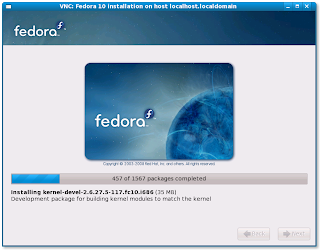
Just started the target machine and selected network boot. This started the installation. The installer could not start X. I chose to use vnc. A screen-shot is attached.

(I already have dhcp, tftp and httpd running on my machine)
1. mount Fedora-10-i386-DVD.iso /mnt -o loop
2. cp /mnt/images/pxeboot/vmlinuz /tftpboot/F10InstKern
3. cp /mnt/images/pxeboot/initrd.img /tftpboot/F10InstInitrd
4. Edit pxeconfig and create an entry for F10 installation
LABEL F10Inst
KERNEL F10InstKernel
APPEND initrd=F10InstInitrd ip=:::::::dhcp admin
(I also made this default)
5. ln -s /mnt/ /var/www/html/f10
Just started the target machine and selected network boot. This started the installation. The installer could not start X. I chose to use vnc. A screen-shot is attached.
Thursday, November 27, 2008
Fedora 10
Just a small note:
Yesterday night I tried the live CD (F10-i686-Live.iso) on my laptop. It had FireFox 1.9. The most attractive stuff was the desktop background and Malayalam i/p methods. I liked swanalekha but I should say that almost all of them were insufficient for me to do anything meaningful. May be they had support, but was not too apparent. The most noticeable stuff was that it was slooooooooow. Could not get my wireless device working (Broadcom Corporation Dell Wireless 1390 WLAN Mini-PCI).
(Acer aspire 4310, Intel celeron 1.6 GHz, 1MB cache, 1 GB RAM)
Yesterday night I tried the live CD (F10-i686-Live.iso) on my laptop. It had FireFox 1.9. The most attractive stuff was the desktop background and Malayalam i/p methods. I liked swanalekha but I should say that almost all of them were insufficient for me to do anything meaningful. May be they had support, but was not too apparent. The most noticeable stuff was that it was slooooooooow. Could not get my wireless device working (Broadcom Corporation Dell Wireless 1390 WLAN Mini-PCI).
(Acer aspire 4310, Intel celeron 1.6 GHz, 1MB cache, 1 GB RAM)
Sunday, May 25, 2008
Installing F9
I had installed Fedora using qemu on a file a while back. I wanted it on my thumb drive also. The immediate solution that came to my mind was
qemu -cdrom f9.iso -hda /dev/sdb -m 256 -boot d
This worked fine till it started installing selinux targeted policy. Then it hung (crashed?). I tried to get rid of it by de-selecting some packages. But, I could not find selinux related packages in the customization list. So, I decided to pass enforcing=0 to kernel. Installing the package should not have caused a difference if the policy was not enforcing. I have no idea why, but, even that did not work.
Currently I am trying to install it using yum. Will post the details once I am done with it.
<update>
yum -c yum.conf --disablerepo=livna --disablerepo=fedora --disablerepo=updates --disablerepo=openswan --enablerepo=Fedora9 --installroot=/mnt install coreutils
yum -c yum.conf --disablerepo=livna --disablerepo=fedora --disablerepo=updates --disablerepo=openswan --enablerepo=Fedora9 --installroot=/mnt install vim
yum -c yum.conf --disablerepo=livna --disablerepo=fedora --disablerepo=updates --disablerepo=openswan --enablerepo=Fedora9 --installroot=/mnt install rpm
yum -c yum.conf --disablerepo=livna --disablerepo=fedora --disablerepo=updates --disablerepo=openswan --enablerepo=Fedora9 --installroot=/mnt install kernel
yum --disablerepo=updates --enablerepo=fedora --installroot=/mnt install grub
You will see that the last line is a bit different. This is because, previous line had installed yum and the new repos defined by the newly installed yum was used.
Fedora9 is my local Fedora9 repo created from rpms found in install DVD.
I could have done all these in one step.
yum -c yum.conf --disablerepo=livna --disablerepo=fedora
--disablerepo=updates --disablerepo=openswan --enablerepo=Fedora9
--installroot=/mnt install coreutils vim rpm kernel grub
qemu -cdrom f9.iso -hda /dev/sdb -m 256 -boot d
This worked fine till it started installing selinux targeted policy. Then it hung (crashed?). I tried to get rid of it by de-selecting some packages. But, I could not find selinux related packages in the customization list. So, I decided to pass enforcing=0 to kernel. Installing the package should not have caused a difference if the policy was not enforcing. I have no idea why, but, even that did not work.
Currently I am trying to install it using yum. Will post the details once I am done with it.
<update>
yum -c yum.conf --disablerepo=livna --disablerepo=fedora --disablerepo=updates --disablerepo=openswan --enablerepo=Fedora9 --installroot=/mnt install coreutils
yum -c yum.conf --disablerepo=livna --disablerepo=fedora --disablerepo=updates --disablerepo=openswan --enablerepo=Fedora9 --installroot=/mnt install vim
yum -c yum.conf --disablerepo=livna --disablerepo=fedora --disablerepo=updates --disablerepo=openswan --enablerepo=Fedora9 --installroot=/mnt install rpm
yum -c yum.conf --disablerepo=livna --disablerepo=fedora --disablerepo=updates --disablerepo=openswan --enablerepo=Fedora9 --installroot=/mnt install kernel
yum --disablerepo=updates --enablerepo=fedora --installroot=/mnt install grub
You will see that the last line is a bit different. This is because, previous line had installed yum and the new repos defined by the newly installed yum was used.
Fedora9 is my local Fedora9 repo created from rpms found in install DVD.
I could have done all these in one step.
yum -c yum.conf --disablerepo=livna --disablerepo=fedora
--disablerepo=updates --disablerepo=openswan --enablerepo=Fedora9
--installroot=/mnt install coreutils vim rpm kernel grub
Saturday, April 28, 2007
whoami
I am Suseelan B Sarin, a software engineer from Bangalore, India. For a long time I wanted to start a Linux blog. I don't claim to be a Linux scholar. But I simply like to use Linux. I re-invented this truth very recently when I saw that I could, with more or less minimal effort, setup ClearCase 7.0 server & client on Fc-5 for my office project while our system admin team still struggles with it even after 2 weeks. (I would have helped them. But they pissed me off in the initial stages & now I have completely deserted them so that they can have fun with with their own woes)
Yesterday I wrote a script to upload build logs from CC to a local web server and I really enjoyed it. I wrote it in bash & I plan to put some time into it and convert it into a PERL script. Now, why I am I posting it here? Its simply because these incidents have brought me back to Linux. In past four years, my only acquaintance with Linux was maintaining a forum and discussion board for my office. Now I plan to take one more dip in that vast ocean. Keep watching this space to find if I will drown or will come back with some precious pearls :)
Subscribe to:
Posts (Atom)